Need to update stock and prices in bulk?
Update quantities, selling prices and wholesale costs for existing products and combinations.
Stock and Prices CSV Updater helps you bulk-update existing PrestaShop products and combinations from CSV files. Manage stock quantities, prices, discounts, product activation and other catalog fields. Run imports manually or with CRON using supplier URLs, uploaded files or an FTP-accessible server folder, with CSV export and detailed import reports.
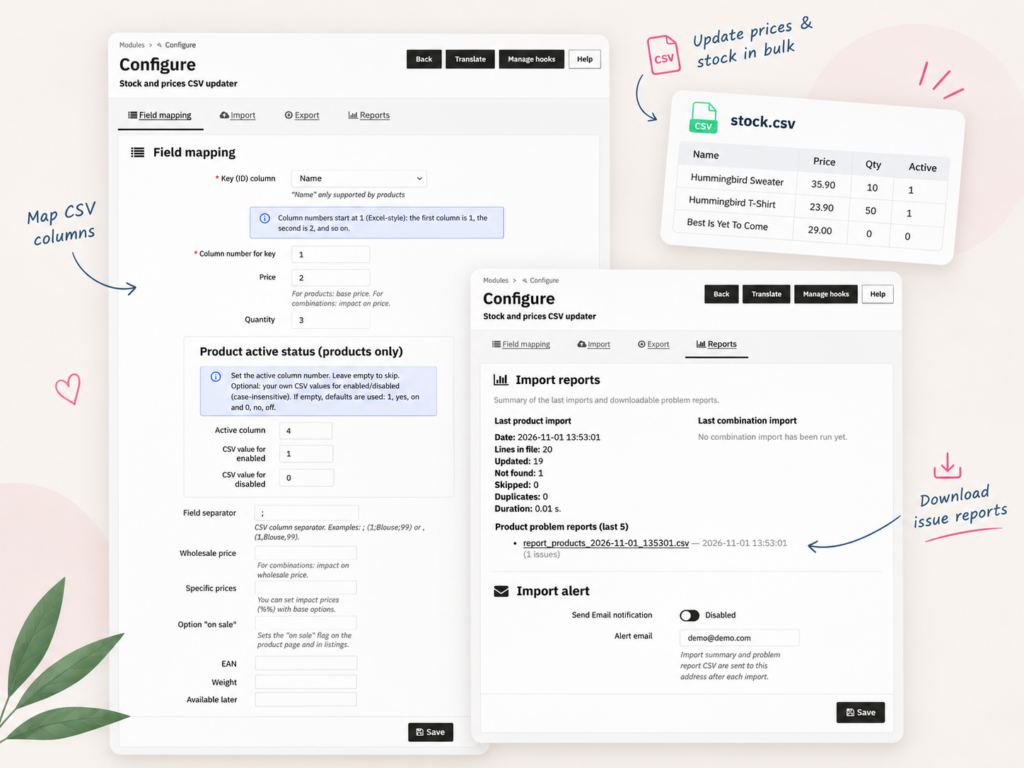
Stock and Prices CSV Updater is designed for merchants who need to update existing catalog data without editing products one by one.
Update quantities, selling prices and wholesale costs for existing products and combinations.
Use a CSV column to enable or disable products, with configurable values for each status.
Update existing percentage-based specific-price reductions and product On sale flags.
Update quantities, price impacts and other supported fields for individual variants.
Use CRON to run recurring imports from a CSV feed URL or a server folder.
Process multiple CSV files from a prepared FTP-accessible folder.
Use an optional stock-reset mode before importing replacement product quantities.
Access CSV export tools, recent import results and email notifications with problem reports.
Stock and Prices CSV Updater lets you update selected fields of existing PrestaShop products using CSV files.
Instead of replacing the entire catalog, you select the information that needs updating.
You can import products, combinations or both, depending on your update workflow.
If your supplier regularly publishes new price lists or stock files, you can automate recurring imports instead of uploading each CSV manually.
The module supports three CSV sources:
Configure the source and field mapping, then use a CRON job to trigger the saved import.
Automatic processing is useful for stores that receive frequently updated supplier quantities or prices.
The module can process multiple CSV files found in a prepared server folder.
You can optionally remove processed files after an import completes according to the module’s processing rules.
This is useful when suppliers deliver CSV files through an external FTP workflow. The module reads the server folder rather than connecting to an FTP server using credentials.
The updater supports more than stock quantities. It can also change whether existing products are active or inactive.
Map a CSV column to the product active status. You can configure which source values mean enabled and disabled.
For example, a supplier file may use 1 and 0 or another configured pair of values.
This makes it possible to update product visibility as part of an existing catalog maintenance workflow.
An optional stock-reset mode sets existing stock quantities to zero before importing replacement product quantities from CSV.
This can support replacement-stock workflows, but it should be tested carefully before use, particularly in multistore configurations.
Product imports also include an option to apply the same CSV quantity to a parent product and its combinations.
When different variants have different quantities, use a combination-level import instead.
In addition to base selling prices and wholesale costs, the module supports selected price and discount-related fields.
Update percentage-based reductions in existing PrestaShop specific-price records.
This updates supported existing reductions; it is not a replacement for creating new complex cart rules or promotional campaigns.
Set the product’s On sale flag from a CSV column to control whether the sale label appears on product pages and listings.
The On sale flag is separate from the actual discount amount.
Supplier files may contain different columns and use different product identifiers.
The updater lets you configure CSV column positions and the field separator.
Supported product matching options include:
Combination imports support matching through applicable variant identifiers.
For reliable recurring imports, use unique and consistent identifiers wherever possible.
| Reference | Quantity | Price | Active |
|---|---|---|---|
| SHIRT-001 | 25 | 29.90 | 1 |
| SHIRT-002 | 0 | 34.90 | 0 |
This illustrative file can be mapped to product references, quantities, selling prices and product status.
The updater includes a dedicated CSV Export section and tools for reviewing import results.
Export supported catalog data into CSV for use in spreadsheets and external data-management workflows.
Access recent product and combination import reports from the back office.
Problem reports help identify import issues such as missing product matches or duplicate identifiers.
Enable email notifications to receive import summaries and problem-report CSV attachments.
This is especially helpful when imports are triggered automatically through CRON.
PrestaShop includes built-in CSV import tools. They are useful for initial catalog creation and various manual data-import tasks.
Stock and Prices CSV Updater focuses on recurring updates to existing products, combinations and selected catalog fields.
| Your task | Suggested approach |
|---|---|
| Create an entirely new catalog | Native import or a full catalog importer |
| Update stock and prices regularly | CSV Product Updater |
| Schedule supplier feed imports | CSV Product Updater |
| Update product activation from CSV | CSV Product Updater |
| Process multiple CSV files from a folder | CSV Product Updater |
| Import complete product images and categories | A full catalog importer |
Stock and Prices CSV Updater is a good fit when your products already exist in PrestaShop and you need to maintain their data regularly.
Choose it when you need:
If you need to create complete new product records, import images, build categories or synchronize full product descriptions, you may need a comprehensive catalog importer instead.
This module is primarily designed to update existing product and combination data.
Stock and Prices CSV Updater updates existing PrestaShop products and combinations from CSV files. It supports stock, prices, selected discounts, product activation and other catalog fields, with manual or CRON-based imports.
Yes. The module supports CRON-triggered imports from configured feed URLs or server files, allowing recurring updates to existing product data.
Yes. You can map a CSV column to product active status and configure which values mean enabled and disabled.
Yes. The module can update percentage reductions in existing specific-price records and update the On sale flag. It does not create a new promotional rule for every imported value.
Yes. Combination imports support stock quantities, price impacts, wholesale price impacts, EAN and weight impacts.
Yes. Import mode supports Products, Combinations, or Products and Combinations, with appropriate source files.
The module includes an optional stock-reset mode that sets existing stock quantities to zero before importing product quantities. It requires careful testing, especially with multistore stock.
Yes. The module processes CSV files placed in its server-side import folder. Files can be uploaded there through an external FTP workflow.
Yes. The folder import mode includes an optional setting to remove files after processing under the module's success rules.
Yes. Product matching options include reference, EAN, supplier reference, PrestaShop product ID and product name.
No. You can configure the CSV field separator and assign source column numbers to supported PrestaShop fields.
Yes. The product mapping includes an Available later field.
Yes. The module includes a dedicated CSV Export section. Available fields depend on the export options.
Yes. The module provides import summaries, recent reports and optional email notifications with CSV problem-report attachments.
The module includes multistore shop-selection settings for supported operations. Stock-reset behavior should be verified before enabling it in a multistore installation.
The primary workflow updates existing PrestaShop products and combinations. For complete product creation with descriptions, images and categories, use a full catalog importer.