Need a tile or flooring calculator?
Let customers enter the area they need and automatically calculate the required number of boxes or packs.
Product Area Calculator helps PrestaShop stores sell tiles, flooring, wallpaper and building materials by area or volume. Customers enter measurements, add multiple surfaces and wastage, and instantly see how many boxes, packs or rolls they need — with coverage, price per unit and total cost calculated automatically.
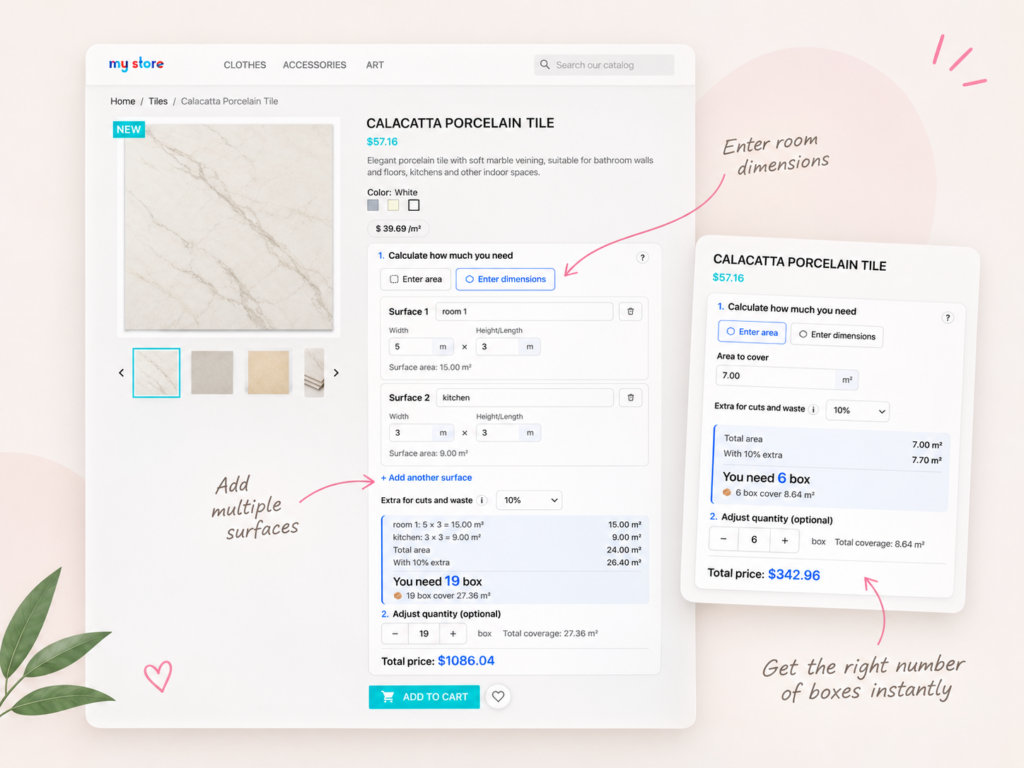
Product Area Calculator helps customers work out how much material to order, whether you sell by square meter, cubic meter or package.
Let customers enter the area they need and automatically calculate the required number of boxes or packs.
Calculate the required area from width and length or height instead of asking shoppers to calculate square meters themselves.
Add several surfaces to one calculation, with individual measurements and a combined material requirement.
Add a configurable wastage allowance to calculate extra material before determining the quantity to order.
Calculate quantities from configured area or volume coverage using boxes, rolls, packages or pieces.
Configure coverage values for individual products and combinations, so the calculation uses the selected variant.
Customers often know the size of the room they want to renovate, but not how many boxes of tiles, flooring packs or rolls to buy.
Product Area Calculator adds a material calculator directly to the PrestaShop product page. Customers enter their measurements, and the module calculates the quantity and total price.
The basic process is simple:
The calculator displays a breakdown of the measurements, required area, extra material, package quantity and calculated price.
For tiles, laminate, parquet and other flooring materials, shoppers usually measure their project in square meters rather than in boxes.
The calculator converts the required area into the number of packages based on the coverage configured for the product.
Imagine a customer needs tiles for a room measuring 5 × 3 meters and a kitchen measuring 3 × 3 meters.
| Calculation | Result |
|---|---|
| Room: 5 × 3 m | 15.00 m² |
| Kitchen: 3 × 3 m | 9.00 m² |
| Total area | 24.00 m² |
| With 10% extra for waste | 26.40 m² |
| Coverage per box | 1.44 m² |
| Required quantity | 19 boxes |
| Total purchased coverage | 27.36 m² |
The module calculates 19 boxes because whole packages are needed to cover the required area.
Customers see how much extra material is included, how many packages they need and the total price before adding the product to their cart.
Customers can choose how to enter the measurements for their project.
If a customer already knows the required area, they can enter it directly, for example 7 m².
The calculator applies the selected wastage allowance and calculates the required quantity.
Alternatively, customers can enter the width and length or height of a surface.
For example, a wall measuring 4 × 2.5 meters has an area of 10 m².
A project may involve several rooms, walls or floors. Customers can add multiple named surfaces, enter the dimensions separately and see a combined calculation.
This helps customers plan a complete project without calculating each surface manually and adding the results themselves.
Tiles, flooring and other building materials may require extra quantity for cuts and waste.
Product Area Calculator supports a configurable wastage allowance that is included in the required material calculation.
For example, a 20 m² floor with 10% extra requires 22 m² of material before package rounding is applied.
For packaged products, the calculator determines how many whole packages are needed to cover that amount.
The appropriate wastage percentage depends on the material, layout and project requirements.
Different building materials are sold using different units.
Product Area Calculator supports square meters (m²), square feet (sq ft) and cubic meters (m³), with configurable product coverage.
In package-based mode, configure the coverage of one box, roll, pack or piece.
The calculator converts the customer’s required area or volume into a quantity of packages.
This is useful for flooring, tiles and other materials sold in complete packages.
The module also offers a selling mode based on the area unit rather than complete packages.
This gives merchants flexibility when products are priced and sold by their measured coverage.
Customers can see the price per configured area or volume unit, package coverage and the calculated total price.
These values update as the required quantity changes.
Some products have combinations with different coverage values.
For example, a flooring product may be available in several packaging options, or variants may represent different material sizes.
The module supports individual area or volume settings for product combinations.
When a customer selects a combination, the calculator can use the coverage configured for that variant.
This is useful when a single product has different package sizes or coverage values.
Merchants can configure the calculator according to the materials they sell.
Available settings include:
The module is also compatible with PrestaShop multistore configurations.
No third-party calculation service is needed. The functionality runs within the PrestaShop module.
Product Area Calculator is a good fit for online stores that sell materials by measured coverage or in packages.
Typical use cases include:
If you sell custom-cut products requiring specialized cutting rules, wallpaper pattern repeat calculations or more complex material-specific formulas, check that the calculation method meets your needs.
Product Area Calculator focuses on area, volume, configurable package coverage, wastage and product quantity calculations.
Product Area Calculator – Price by Area & Packs calculates the number of tile boxes required from the customer's area or room dimensions. It supports configurable box coverage, wastage allowance, whole-package calculations and total pricing.
Yes. Customers can enter width and length or height, and the module calculates the surface area. They can also enter an already known area directly.
Yes. Customers can add multiple surfaces, such as rooms, floors or walls, with separate dimensions. The calculator combines their areas to determine the material requirement.
Yes. Product Area Calculator supports a configurable allowance for cutting waste and extra material. The allowance is included before calculating the required package quantity.
Yes. Configure how much area one flooring pack covers. Customers enter their required area and the calculator determines the number of whole packs needed, including the selected wastage allowance.
Yes. Product Area Calculator supports selling by area unit as well as by complete packages. It can display price per square meter and calculate the total price for the required quantity.
Yes. The module supports package-based selling while displaying area-based pricing and coverage. Customers can see how many boxes are needed and the total price.
Yes. Supported measurement units include square meters (m²), square feet (sq ft) and cubic meters (m³).
Yes. The module supports cubic meters (m³) for products configured with volume-based coverage.
Yes. Product Area Calculator supports roll-based products using configured area coverage and wastage. Specialized wallpaper pattern-repeat calculations are not described among its documented features.
Yes. Merchants can configure different area or volume values for product combinations, allowing the calculation to use the coverage of the selected variant.
Yes. The calculator provides a quantity adjustment control, allowing shoppers to change the calculated package quantity before adding the product to their cart.
Yes. The module supports configurable calculator placement on PrestaShop product pages.
Yes. Product Area Calculator supports PrestaShop multistore configurations.
No. Product Area Calculator works as a PrestaShop module without requiring a third-party calculation service.