Want customers to become sellers?
Let customers apply for a seller account. Review applications and approve vendors before they start selling.
Turn your PrestaShop store into a multi-vendor marketplace. Let customers become sellers, manage products from a dedicated dashboard, track orders and earnings, and request payouts. Control seller approvals, product moderation and commissions from your PrestaShop back office.
Multi-Vendor Marketplace helps store owners manage multiple sellers, their products, commissions and earnings within an existing PrestaShop store.
Let customers apply for a seller account. Review applications and approve vendors before they start selling.
Give sellers a dedicated account area to manage products, view orders, track earnings and request payouts.
Allow sellers to create and edit products without giving them access to the PrestaShop Back Office.
Moderate submitted products before publication and control which categories sellers can use.
Configure global or seller-specific commissions and calculate seller earnings from eligible orders.
Track seller balances, review withdrawal requests and manage payout and transaction history.
A traditional PrestaShop store sells products managed by one merchant. A multi-vendor marketplace allows multiple sellers to offer their products through the same store.
Multi-Vendor Marketplace adds seller accounts, product management, moderation, commissions and payout workflows to your existing PrestaShop installation.
Customers can apply to become sellers and manage their marketplace activity through a dedicated seller dashboard.
The marketplace owner remains responsible for approving sellers, moderating products, configuring commissions and managing seller balances and withdrawals.
This approach can be used for niche marketplaces, handmade products, local seller communities, digital products and B2B catalogs.
Sellers need a convenient way to manage their marketplace activity without accessing the store administrator’s Back Office.
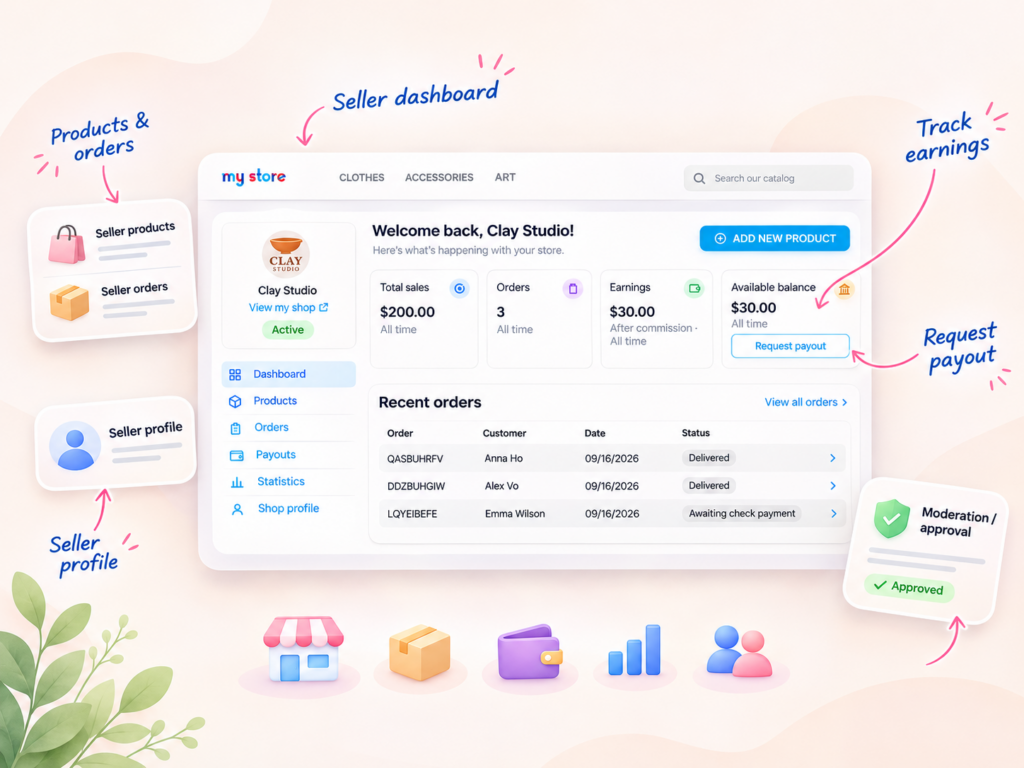
The module provides a dedicated seller dashboard inside the customer’s account area.
From this dashboard, sellers can:
The dashboard displays sales activity, order counts, seller earnings and available balance.
Sellers can also review statistics for all time, this month, last month and the current year.
Sellers can view orders containing their products and review the associated earnings activity.
The account includes information about transactions, payouts and refunds, helping sellers understand their balance.
Marketplace sellers can create and edit their products from the seller area without PrestaShop Back Office access.
The seller product form supports physical and virtual products.
Supported product information includes:
Marketplace administrators can configure which product fields are available to sellers.
This helps limit the seller interface to the product information needed for the marketplace.
Product moderation gives administrators control over seller submissions.
Sellers can see their products’ approval status in the seller account, while administrators review products before publication.
Not every customer needs immediate permission to sell products.
Multi-Vendor Marketplace includes a seller application and approval workflow.
Customers apply from their account, and administrators decide which applicants can become marketplace sellers.
Choose which PrestaShop customer groups are allowed to participate in the marketplace.
This can be useful for member-only marketplaces or B2B seller programs.
Configure which categories sellers can use for their products.
For example, a handmade marketplace may accept products only within approved craft and accessory categories.
Administrators have a dedicated Marketplace section for managing sellers and seller products.
They can edit seller products, assign products to sellers and review submitted content.
An optional read-only mode can also restrict seller editing when needed.
A marketplace needs a way to divide revenue between the store owner and individual sellers.
Multi-Vendor Marketplace supports global and seller-specific commission settings.
Set a percentage-based shop commission that applies to marketplace sales.
For example, with a 10% shop commission on an eligible €100 product amount, the seller’s calculated share would be €90 before other applicable adjustments.
Define a different commission for a specific seller when their commercial agreement differs from the default.
The module also supports configuring a fixed seller earning per item.
Choose whether seller earnings are calculated using product totals including or excluding tax.
The module calculates seller earnings when orders reach the configured eligible order statuses.
Review your commission and order-status configuration before launching the marketplace.
Sellers can see their earnings and available balance in the marketplace dashboard.
When a seller is eligible to withdraw funds, they can submit a payout request from their account.
Configure a minimum balance required before sellers can request a withdrawal.
Marketplace administrators can manage seller payout requests, balances and transaction history.
The seller dashboard also shows payout activity.
Important: the module provides a withdrawal request and payout management workflow. This should not be confused with automatic money transfers through a payment provider.
Customers can purchase products from different sellers through the same PrestaShop store.
Sellers can view order history, order details and recent sales involving their products.
They can also receive notifications about new orders.
Order fulfillment, shipping and carrier management remain under the store owner’s control.
This means sellers manage their product listings and view relevant order information, while the marketplace administrator retains responsibility for delivery operations.
This is an important consideration when planning a marketplace where each seller would otherwise expect independent shipping management.
Each seller can manage a profile containing information about their marketplace business.
Seller profile fields include:
Seller information can also be displayed on product pages, helping customers identify the vendor offering the product.
The module includes email templates for important marketplace events.
These notifications support communication between administrators and sellers as marketplace activity grows.
This module is a good fit when you want multiple vendors to contribute products to a single PrestaShop storefront.
Typical use cases include:
You can control seller registration, product publication, categories, commissions and withdrawals while giving sellers their own working area.
If every seller must independently manage carriers, shipping methods, shipment fulfillment or automatic payment splitting, check for additional marketplace capabilities before choosing a solution.
Multi-Vendor Marketplace focuses on seller accounts, product management, approvals, commissions, earnings and payout requests, with fulfillment remaining under the store owner’s control.
Multi-Vendor Marketplace turns an existing PrestaShop store into a marketplace where customers can become sellers. It includes a dedicated seller dashboard, product management, seller and product moderation, commissions, sales statistics and payout requests.
Yes. Customers can apply for seller accounts from their customer area. Marketplace administrators review applications and approve sellers.
Yes. Sellers have their own dashboard inside the customer account, where they can manage products, view orders, track sales and earnings, check balances and request payouts.
Yes. Sellers can create and edit products directly from their seller area without administrator access to the PrestaShop Back Office.
Yes. The module supports product moderation before publication. Sellers can also view the approval status of their submitted products.
Yes. The marketplace owner can review seller applications and approve or manage seller accounts.
Yes. Administrators can choose which customer groups are eligible to become sellers and which product categories sellers can use.
Yes. Seller product management supports combinations, attributes, prices, quantities, images and other configurable product fields.
Yes. The module supports both physical and virtual products.
Administrators can set a global percentage-based shop commission or configure seller-specific commissions. The module also supports fixed seller earnings per item, tax-inclusive or tax-exclusive calculations, and earnings calculation based on configured order statuses.
Yes. You can define individual commission settings for particular sellers instead of applying only the global marketplace commission.
Yes. Sellers can view their available balance and submit withdrawal requests. Marketplace administrators manage requests, balances and payout history.
The documented functionality includes withdrawal requests, payout management and transaction history. Automatic payment-provider transfers are not included in the stated features.
Yes. Products from different sellers can be purchased through the same PrestaShop storefront. Order fulfillment and shipping remain under the store owner's control.
No. In this module, order fulfillment, shipping and carrier management remain the responsibility of the marketplace owner.
Yes. Sellers can view their order history, sales activity, earnings, refunds and statistics for all time, this month, last month and this year.
Yes. Sellers can manage their profile, including logo, description, address and payment information. Seller information can also appear on product pages.
Yes. The module includes email templates for seller applications, product submissions, seller activation, product approvals, new orders and withdrawal requests.
The module includes an optional read-only mode for sellers, allowing administrators to restrict seller editing.
Yes. The module includes multi-language support.