Need a ChatGPT product feed for PrestaShop?
Generate a structured OpenAI product feed directly from your existing PrestaShop catalog and download it as CSV.GZ.
ChatGPT Merchant Feed Generator and Validator helps PrestaShop merchants prepare product data for OpenAI product feeds. Generate a CSV.GZ feed with products, variants, prices, availability and images, check your catalog for missing information, and fix errors before submission — without a third-party feed service or additional subscription.b
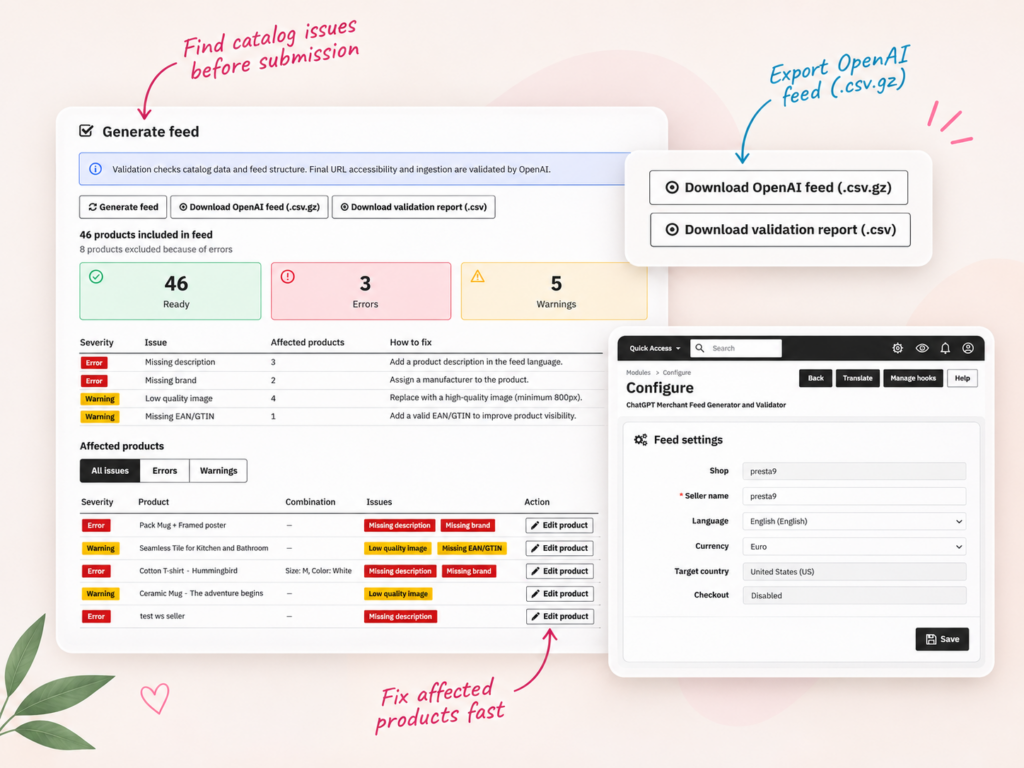
ChatGPT Merchant Feed Generator and Validator helps you prepare, check and export your PrestaShop catalog for OpenAI product feed submission.
Generate a structured OpenAI product feed directly from your existing PrestaShop catalog and download it as CSV.GZ.
Validate product data and identify missing descriptions, brands, images and other feed quality issues.
Export products and variants with stable identifiers, variant grouping, attributes, prices and availability.
See affected products and combinations, understand each issue and open the product editor directly from the validation report.
Export a CSV report showing detected catalog issues so you can review and correct them before submission.
Generate and validate your feed inside PrestaShop without an additional feed subscription or OpenAI API key.
If you want to provide product data directly to OpenAI, you need a structured feed containing information about the products you sell.
ChatGPT Merchant Feed Generator and Validator creates a product feed from your existing PrestaShop catalog, including products and combinations.
Instead of preparing product rows manually, the module reads supported catalog information and generates a compressed CSV.GZ file.
The feed includes:
CSV.GZ is one of the supported file formats for OpenAI product feeds.
The module prepares the file for a merchant feed submission workflow. Access to direct feed onboarding and final acceptance are managed separately by OpenAI.
A product feed is only as useful as the data inside it.
Missing descriptions, invalid identifiers or incomplete brand information can prevent products from being included in a valid export.
The built-in Feed Health checker reviews catalog data and feed structure before you download the file.
The validation dashboard displays counters for Ready, Errors and Warnings.
This gives you a quick overview of the feed generation results and the catalog issues that still need attention.
The dashboard groups detected problems by severity and explains how to correct them.
Examples include:
Errors and warnings are shown separately, helping you prioritize the most important fixes.
Instead of searching your entire catalog, open the list of affected products and combinations.
Each entry shows the detected issues and includes a direct link to edit the product in PrestaShop.
Correct the source data, generate the feed again and review the updated validation results.
The validation process is designed to make catalog problems visible before the feed is sent to OpenAI.
For example, the demonstration dashboard shows a feed generation result with:
The issue summary identifies problems such as missing descriptions, missing brands, low-quality images and missing EAN/GTIN values.
Below the summary, you can see the individual affected products, including combinations where applicable.
Products with critical validation errors are excluded from the generated feed.
Warnings identify data quality issues that should be reviewed, even when they do not prevent a product from being exported.
This helps you prepare a cleaner feed without manually inspecting every product record.
A PrestaShop product may have multiple combinations, such as different colors or sizes.
These combinations can have their own prices, stock availability and identifiers.
ChatGPT Merchant Feed Generator supports products and combinations in the exported feed.
It includes stable item identifiers, appropriate variant grouping and supported attributes such as color and size.
Imagine a T-shirt available in several sizes and colors. Each purchasable combination may have different availability.
The feed can represent those variants using their own item identifiers while retaining their relationship to the parent product.
This allows structured catalog data to describe the actual options customers can buy, rather than treating every variant as an unrelated product.
The module supports PrestaShop multistore, multilingual catalogs and multiple currencies.
Configure the feed using the relevant shop, seller name, language and currency settings.
These settings help determine which catalog data is used when generating the export.
Product descriptions, prices and other details should be accurate for the chosen language, currency and target market.
If you operate multiple stores or sell internationally, review the appropriate feed configuration for each intended submission.
Once the catalog has been checked, use the module’s export controls to download the generated files.
The module provides:
The validation report can help you organize product data corrections before preparing another export.
Feed generation and catalog validation run directly inside PrestaShop.
You do not need an external feed generation subscription or an OpenAI API key to generate the file.
This does not remove any separate requirements imposed by OpenAI for merchant onboarding or feed submission.
Generating a feed and submitting it to OpenAI are separate steps.
Direct product feed onboarding is currently available to approved OpenAI partners.
See the official OpenAI product feed documentation for current onboarding and submission requirements.
No. A generated feed does not automatically make products appear in ChatGPT shopping results.
OpenAI controls feed acceptance, ingestion and product selection.
The module checks supported catalog fields and feed structure before submission. It does not validate final URL accessibility or confirm successful ingestion by OpenAI.
ChatGPT Merchant Feed Generator and Validator is designed for merchants who want to prepare their existing PrestaShop catalog for OpenAI product feeds.
It is a good fit when you need:
If you need automated delivery to OpenAI, merchant onboarding management, instant checkout integration or feeds for multiple advertising platforms, verify that your chosen solution provides those additional capabilities.
This module focuses on generating, validating and exporting a product feed from PrestaShop.
ChatGPT Merchant Feed Generator and Validator generates an OpenAI product feed directly from PrestaShop. It exports products and combinations with prices, availability, images, brands and identifiers in CSV.GZ format, with built-in validation before export.
Yes. The module generates a structured product feed from your existing PrestaShop catalog and lets you download it as a compressed CSV.GZ file.
Yes. The built-in Feed Health checker examines supported catalog data and feed structure, shows errors and warnings, and identifies products that need corrections.
Validation includes checks for missing descriptions, missing brands, image quality issues and product identifiers. Detected problems are grouped by severity and linked to affected products.
Yes. The validation dashboard lists affected products and combinations, shows their detected issues and provides links to edit those products in the PrestaShop back office.
Products with critical validation errors are excluded from the generated feed. The dashboard reports detected issues so merchants can correct the source data and generate the feed again.
Yes. The module provides a downloadable CSV validation report containing detected catalog issues.
Yes. The module exports products and combinations with stable item identifiers, variant grouping and supported attributes such as size and color.
Yes. The feed includes supported product information such as regular and sale prices, availability, product URLs, images and brand data.
Yes. Valid EAN or GTIN values are included when available in the PrestaShop catalog. Missing identifiers can also be highlighted during validation.
Yes. The module supports multistore configurations, multilingual catalogs and currency selection for feed generation.
No. Product feed generation and local validation do not require an OpenAI API key.
No. The module generates and validates the feed directly inside PrestaShop, without requiring an additional feed service subscription.
No. The module generates and exports the product feed. Direct submission and ingestion depend on OpenAI merchant onboarding and the delivery method available to the merchant.
No. Generating a feed does not guarantee product visibility. OpenAI controls merchant onboarding, feed ingestion and the selection of products shown in ChatGPT.
No. The module prepares and validates product feed data. Checkout integrations require separate capabilities and approval.
No. The module validates supported catalog data and feed structure locally. Final URL accessibility, submission acceptance and feed ingestion are validated separately by OpenAI.