Need to increase all prices by a percentage?
Raise or lower selected product prices by a percentage, such as +10% or -15%.
Mass Price Update lets you change prices for PrestaShop products and combinations in bulk. Increase or decrease prices by percentage, fixed amount or coefficient, or set an exact value. Select products by category or manufacturer, preview changes before applying them, and use backups to restore previous prices. Supports manual and CRON-based updates.
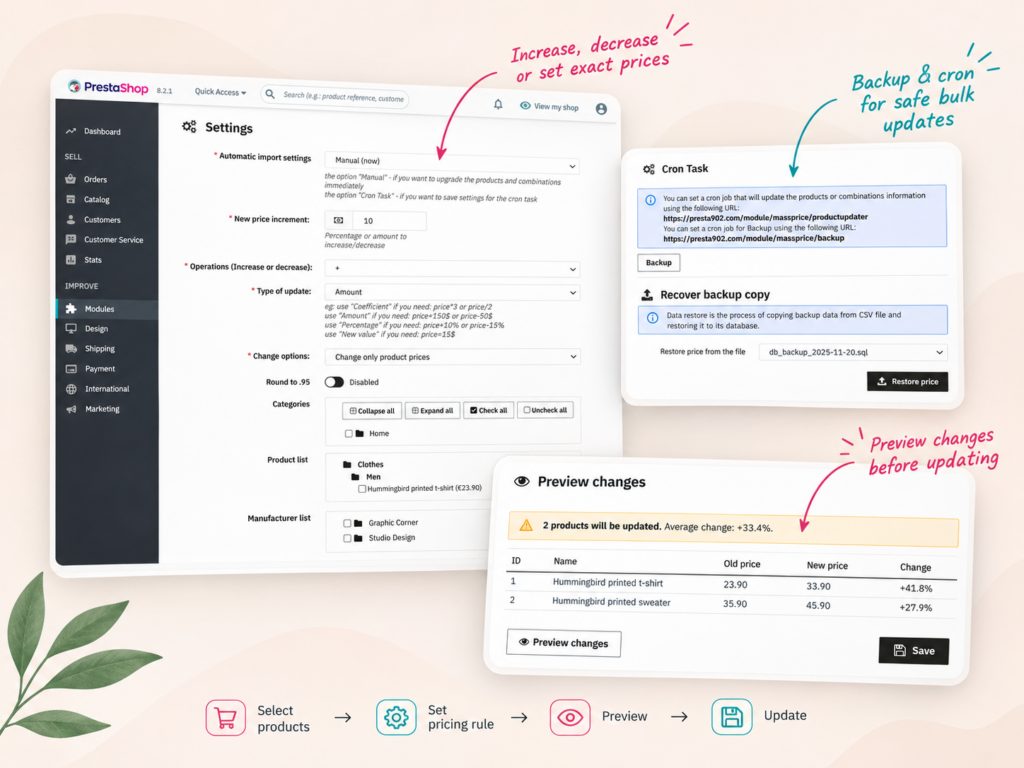
Mass Price Update helps merchants change prices across existing products and combinations without editing every item individually.
Raise or lower selected product prices by a percentage, such as +10% or -15%.
Select products from a specific manufacturer and apply the same pricing rule in bulk.
Update product prices, combination price impacts or both in one operation.
Apply a coefficient to adjust prices across selected products without calculating each value manually.
Compare current and calculated prices and review affected products before applying changes.
Use CRON for recurring price updates and backup tools to restore previous prices when necessary.
Changing prices manually can take hours when your store contains hundreds or thousands of products.
Mass Price Update (Products and Combinations) allows you to apply pricing rules to selected products directly from the PrestaShop back office.
Choose the products you want to update, configure the pricing operation and preview the calculated results before applying changes.
The basic workflow is:
The module supports manual execution and CRON-based processing for recurring updates.
Different pricing tasks require different calculations. Mass Price Update supports four types of pricing operations.
Apply a percentage change to existing prices. For example, increase selected prices by 10% or reduce them by 15%.
Add or subtract a fixed monetary amount from existing prices.
For example, increase every selected product price by €10.
Use a coefficient when your pricing strategy requires multiplication or division.
For example, multiply selected prices by 1.2 or divide them by 2.
Replace selected prices with a specific value instead of calculating a relative increase or decrease.
This is useful when several products need the same target price.
An optional rounding setting allows calculated prices to end in .95.
Use the preview to check the resulting prices before committing the update.
You do not always need to change prices across the entire catalog.
Mass Price Update provides product selection controls so you can limit the operation to the relevant items.
Select product categories from the category tree and apply a pricing rule to the chosen products.
For example, you may increase the prices of products in a flooring category without changing the rest of the catalog.
Select a manufacturer to target products associated with that brand.
This is useful when a manufacturer announces a general price increase.
Use the product tree to choose specific products when the pricing update should affect only a small part of the catalog.
Category, manufacturer and product selection controls can be used together to narrow the products affected by a pricing rule.
Products with combinations may have different prices depending on their selected variants.
In PrestaShop, combination pricing can include a price impact added to the product’s base price.
Mass Price Update supports changing product prices, combination price impacts, or both.
Choose the appropriate update mode based on which prices need adjustment.
Imagine a product with several variants that have different price impacts.
If you only need to increase the product’s base price, use the product price update mode.
If you also need to adjust the extra amounts associated with combinations, select the appropriate combination update mode.
Preview the results before applying changes, especially when products have many variants.
Updating thousands of prices without checking the results can be risky.
The built-in Preview changes feature shows affected products and calculated prices before the update.
The preview includes product IDs, names, current prices, calculated new prices and percentage changes.
Suppose you select two products and configure a fixed increase of €10.
| Product | Old price | New price | Change |
|---|---|---|---|
| Hummingbird printed t-shirt | €23.90 | €33.90 | +41.8% |
| Hummingbird printed sweater | €35.90 | €45.90 | +27.9% |
This example comes from the module’s demonstration interface.
Although the same €10 increase is applied to both products, the percentage change is different for each original price.
The preview makes those differences visible before you commit the operation.
Price updates can affect a large number of products, so having a recovery option is important.
Mass Price Update includes backup and restore tools for product pricing data.
Create a backup copy of the relevant pricing data before applying a major update.
This provides a recovery point if you need to return to previous values.
The Recover backup copy section lets you select an available backup file and restore saved prices.
This is particularly useful when a pricing rule was configured incorrectly or needs to be reversed.
Always verify the selected backup and its scope before restoring prices, especially if other changes have happened since the backup was created.
Some pricing rules need to be executed regularly rather than as one-time changes.
Mass Price Update supports manual execution and CRON-based updates.
Choose Manual mode when you want to configure and run a specific price adjustment immediately.
Select the CRON task mode to save the settings for an automated update.
The module provides a URL that can be called by an external CRON job.
The CRON section also provides a separate backup URL.
Configure the scheduling on your server according to when your pricing rules should run.
Before enabling recurring updates, review the rule carefully to avoid unintended repeated price changes.
Both modules can update prices in PrestaShop, but they are designed for different workflows.
| Your task | Suggested solution |
|---|---|
| Increase prices by 10% for one manufacturer | Mass Price Update |
| Reduce prices by a fixed amount in a category | Mass Price Update |
| Multiply prices using a coefficient | Mass Price Update |
| Preview calculated price changes | Mass Price Update |
| Import individual prices from supplier CSV files | CSV Product Updater |
| Synchronize stock quantities from CSV | CSV Product Updater |
| Update product activation from CSV | CSV Product Updater |
Choose Mass Price Update when you want to calculate new prices from existing prices using a common rule.
Choose Stock and Prices CSV Updater when your supplier provides a file containing individual product prices, stock quantities or other supported catalog fields.
Mass Price Update is designed for merchants who need to adjust existing prices across multiple products or combinations.
It can be a good fit when you need:
The module has been tested on catalogs containing more than 40,000 products. Actual execution time depends on the store and hosting environment.
It also supports PrestaShop multistore configurations.
If you need to import different prices for individual products from a supplier spreadsheet, a CSV product updater is more appropriate.
If you want temporary promotions with customer-group conditions, date ranges or cart-based discounts, consider PrestaShop’s native specific-price and promotional rule functionality.
Mass Price Update is primarily a tool for changing stored product and combination prices in bulk.
Mass Price Update (Products and Combinations) lets merchants increase or decrease existing product and combination prices by a percentage, fixed amount or coefficient, or set exact values. It includes product selection, preview, backup and CRON support.
Yes. Select the products you want to update, choose a percentage increase and enter 10. The module calculates the new prices and lets you preview the results before applying changes.
Yes. Mass Price Update supports manufacturer-based selection, allowing you to apply a pricing rule to products associated with a chosen manufacturer.
Yes. Use the category tree to select the categories whose products you want to update.
Yes. The module includes individual product selection, allowing you to limit a pricing operation to specific products.
Yes. Mass Price Update supports changing product prices, combination price impacts or both, according to the selected update mode.
Yes. The coefficient operation supports multiplying or dividing existing prices by a configured value.
Yes. The exact-value operation replaces the selected prices with a configured value rather than applying a relative adjustment.
Yes. Mass Price Update includes an optional setting to round calculated prices to .95.
Yes. The Preview changes feature shows affected products with their current prices, calculated new prices and percentage changes before the update is applied.
The module includes backup and restore functionality. Create a backup before changing prices, then select the appropriate backup file in Recover backup copy to restore saved prices if necessary.
Yes. Mass Price Update supports CRON task mode and provides an update URL for an external server-side scheduler. A separate backup URL is also available.
Yes. The module has been tested with catalogs containing more than 40,000 products. Actual processing time depends on the catalog, selected operation and hosting environment.
Yes. Mass Price Update supports PrestaShop multistore configurations.
Mass Price Update calculates new prices using rules such as percentage, fixed amount or coefficient. Stock and Prices CSV Updater imports individual product values from CSV files, including prices, stock and other supported fields.
No. The module calculates new prices from existing PrestaShop prices using configured rules and product selection. A supplier CSV file is not required.
The module primarily changes stored product and combination prices. For temporary promotions with date ranges, customer-group restrictions or cart conditions, PrestaShop specific prices or promotional rules may be more suitable.