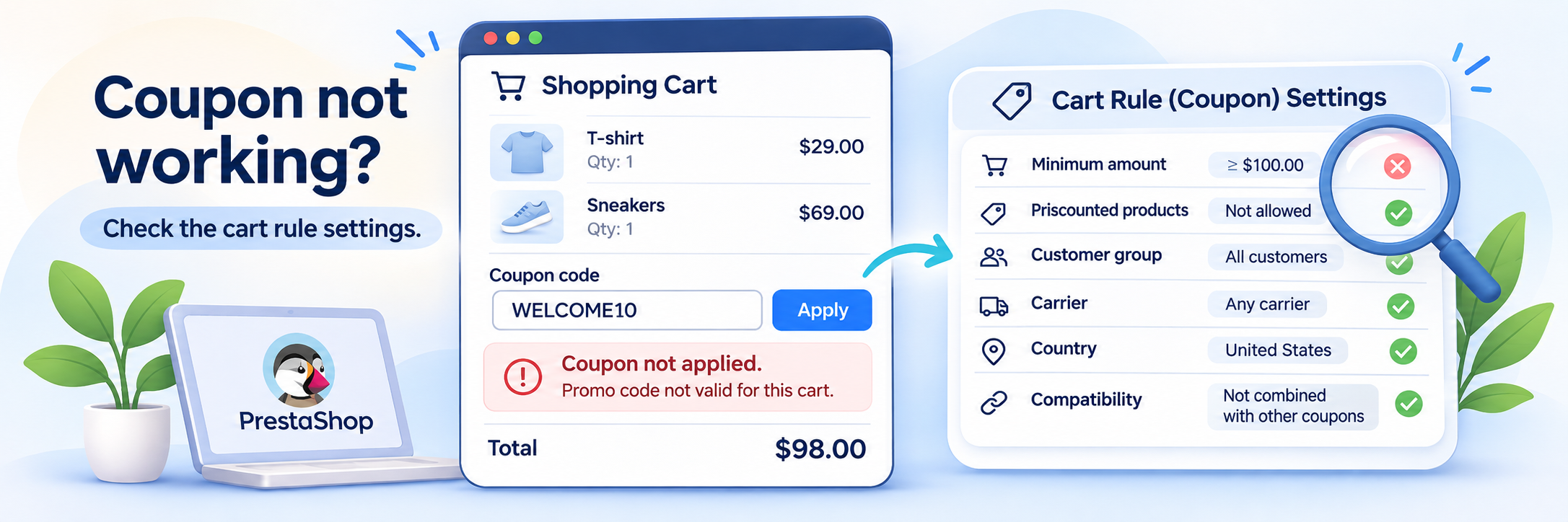
A customer enters a discount code at checkout, but PrestaShop refuses to apply it.
The coupon exists, it’s active, and it may even work perfectly in your own test account.
Before looking for a checkout bug, open the Cart Rule and check its conditions. PrestaShop validates more than the coupon code itself, and a small restriction can be enough to reject it.
Start with the Cart Rule Settings
In PrestaShop 8, go to Catalog → Discounts → Cart Rules and open the coupon.
Here’s what to check first:
| Setting | What can go wrong |
|---|---|
| Validity dates | The coupon has expired or isn’t valid yet |
| Usage limits | The global limit or per-customer limit has been reached |
| Minimum amount | The cart doesn’t meet the required amount |
| Exclude discounted products | Products already on sale aren’t eligible for the discount |
| Country, carrier, customer group | The customer doesn’t meet one of these restrictions |
| Product selection | The cart doesn’t contain the required eligible products |
| Compatibility with other cart rules | Another coupon conflicts with this one |
If you’ve configured a product selection, check the required quantity too. A rule can require a certain number of matching products, not simply the presence of one eligible item.
Check the Customer’s Actual Shopping Cart
Here’s a useful Back Office feature that often gets overlooked.
Go to Orders → Shopping Carts and find the customer’s cart.
You can inspect its products, quantities and totals without asking the customer to send screenshots of everything they’ve added.
Check the delivery address and carrier information as well, where available. Some checkout details may not have been selected yet.
Compare what you find with the Cart Rule:
- Does the cart contain eligible products?
- Does its calculated amount meet the minimum?
- Is the delivery country allowed?
- Is the selected carrier eligible?
- Does the customer belong to an allowed group?
- Is another voucher already applied?
One thing worth remembering when debugging PrestaShop discounts: two customers can enter exactly the same code and get different results. The difference is often in their carts, not in the coupon itself.
If the coupon works in your account but fails for a customer, compare the actual cart conditions before changing the rule.
The Minimum Amount Can Be Misleading
Suppose your coupon requires a minimum order of €50.
The customer’s cart contains:
- Products: €48
- Shipping: €8
- Total: €56
The customer sees €56 and expects the coupon to work.
But if the Cart Rule excludes shipping from its minimum amount calculation, the eligible total is still €48.
The coupon is rejected.
Also check whether the minimum amount includes or excludes taxes.
It’s a small configuration detail, but it can completely change whether a cart qualifies for the discount.
What About Products Already on Sale?
Another setting worth checking is Exclude discounted products, found in the Cart Rule’s Actions tab for percentage discounts.
When enabled, the coupon doesn’t apply to products that already have a reduction.
If every product in the cart is on sale, PrestaShop may reject the voucher entirely.
If the cart contains both regular and discounted products, the discount can apply only to eligible products.
This is worth checking before changing the coupon’s dates or usage limits. The code may be perfectly valid while the cart contains nothing it can discount.
Why Does One Coupon Work but Two Don’t?
A customer already has a welcome coupon in their cart. They try to apply a birthday coupon, and PrestaShop refuses the second code.
Open Conditions → Compatibility with other cart rules.
In the classic Cart Rules system, discounts can be combined unless compatibility restrictions prevent it.
Check both rules and their priorities. Depending on their configuration, PrestaShop may reject the new coupon or remove a conflicting one.
A welcome coupon and a birthday coupon may both be valid individually, but that doesn’t mean they should work together.
Check their compatibility settings before changing anything else.
What Do PrestaShop Coupon Errors Mean?
PrestaShop’s error messages can help narrow down the problem.
Here are examples from the English PrestaShop 8.2.x Cart Rule validation code. Wording may differ in other versions, translations or customized checkouts.
| Error message | What to check |
|---|---|
| “This voucher has expired” | The end date of the Cart Rule |
| “You cannot use this voucher anymore (usage limit reached)” | The per-customer usage limit |
| “The minimum amount to benefit from this promo code is…” | Minimum cart amount, taxes and shipping |
| “This voucher is not combinable with an other voucher already in your cart: …” | Compatibility settings and rule priorities |
| “You cannot use this voucher on products on sale” | Exclude discounted products |
Some errors are less specific. For example, “You cannot use this voucher” can be returned for different eligibility restrictions.
In that case, inspecting the customer, cart and rule conditions is more useful than guessing from the message alone.
What If All the Settings Look Correct?
Create a temporary test Cart Rule with a small discount and no customer, product or minimum-order restrictions.
Try it in the same cart.
If the test coupon works, compare its settings with the original rule.
If even an unrestricted coupon fails, look at the checkout implementation, overrides, and modules that modify cart or discount behavior.
For automatically generated coupons, the same checks apply. A welcome or birthday voucher still has to satisfy the conditions of its underlying Cart Rule.
I’ve covered automatic coupon creation separately in How to Send a Welcome Coupon After Registration in PrestaShop.
Next time a customer reports a broken coupon, start by opening their shopping cart in Back Office. It’s often the fastest way to find which condition doesn’t match.