
Switching to a new reviews module in PrestaShop? One thing you probably don’t want to lose is all the reviews your customers have already written.
The good news is that you can move your PrestaShop Product Comments to another reviews module without losing your existing reviews. You just need to make sure the new module supports importing them.
There are two common ways to do this: import reviews directly from Product Comments or use a CSV file.
I’ll show you both methods, along with a few things worth checking before and after the move.
What Happens to Your Existing PrestaShop Reviews?
PrestaShop’s standard Product Comments module stores reviews in the database, not inside the product descriptions.
Each review can include:
- A product ID
- Customer name
- Review title and text
- Star rating
- Publication date
- Approval status
Some reviews may also have additional rating criteria.
When you switch modules, this information doesn’t automatically move to the new one. Each module has its own way of storing and displaying reviews.
That’s why simply installing a new reviews module doesn’t mean your old reviews will appear there.
You need to import them first.
Step 1: Back Up Your Reviews
Before doing anything, make a database backup.
It’s a simple precaution, especially if your store has hundreds or thousands of reviews.
If you’re comfortable working with the database, you can also check how many reviews you currently have.
The standard Product Comments module uses a table called ps_product_comment (your database prefix may be different).
To count all review records, run:
SELECT COUNT(*) FROM ps_product_comment;
If you only want to count approved reviews that haven’t been deleted:
SELECT COUNT(*) FROM ps_product_comment WHERE validate = 1 AND deleted = 0;
Write down the numbers. They’ll be useful after the import.
And don’t uninstall the old Product Comments module yet. Keep it until you’ve checked that everything works.
Step 2: Import PrestaShop Product Comments
This is the easiest option if your new module supports direct import from PrestaShop Product Comments.
For example, I added this feature to my Advanced Product Reviews module.
Here’s how it works:
- Install Advanced Product Reviews.
- Open the module configuration page.
- Go to Import CSV.
- Click Import PrestaShop reviews.
That’s it. The import starts right away.

You don’t need to export anything or prepare a file. The module already knows how the standard Product Comments tables are structured, so it can read the existing reviews directly.
This saves quite a bit of work compared to exporting everything manually.
If you’re using a different reviews module, check whether it has a similar import feature. Not all modules do.
Step 3: What If Your Reviews Come from Another Module?
Sometimes you aren’t moving from the standard Product Comments module.
Maybe you’ve used another reviews module for years. Or you’re moving reviews from an older store.
In that case, CSV import is usually worth looking at.
Advanced Product Reviews also has a CSV importer where you can tell the module which columns contain which information.
For example:
| CSV column | What it contains |
|---|---|
| Product ID | Product the review belongs to |
| Customer name | Reviewer’s name |
| Rating | Star rating |
| Review title | Review heading |
| Review comment | Review text |
| Adding date | Original review date |
| Review status | Approved or pending |
To use it:
- Export your reviews to a CSV file.
- Open Import CSV in Advanced Product Reviews.
- Select your file and set the field separator.
- Match the CSV columns with the review fields.
- Save the settings and complete the import.
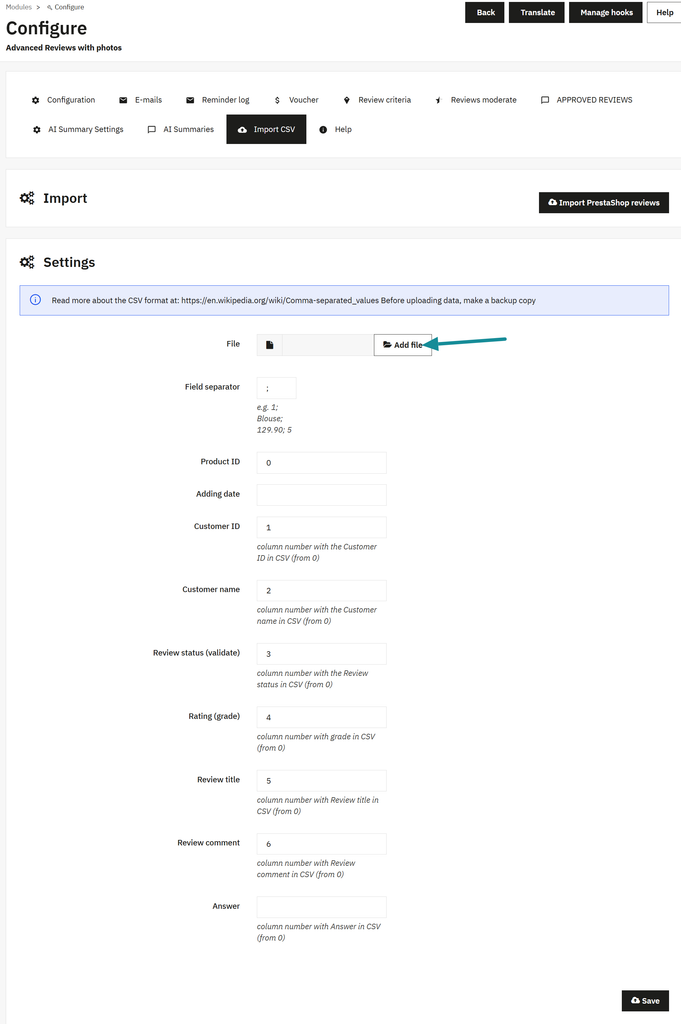
One thing to watch out for: product IDs.
If you’re moving reviews between two different stores, product IDs might not match. A review for product 125 in your old store could end up attached to a completely different product in the new one.
Check this before importing everything. I would test a small sample on a staging store first.
Step 4: Check Your Reviews After Import
Even if the import finishes without errors, take a few minutes to check the result.
Open the reviews list in your new module.
In Advanced Product Reviews, you can find approved reviews under Approved Reviews.
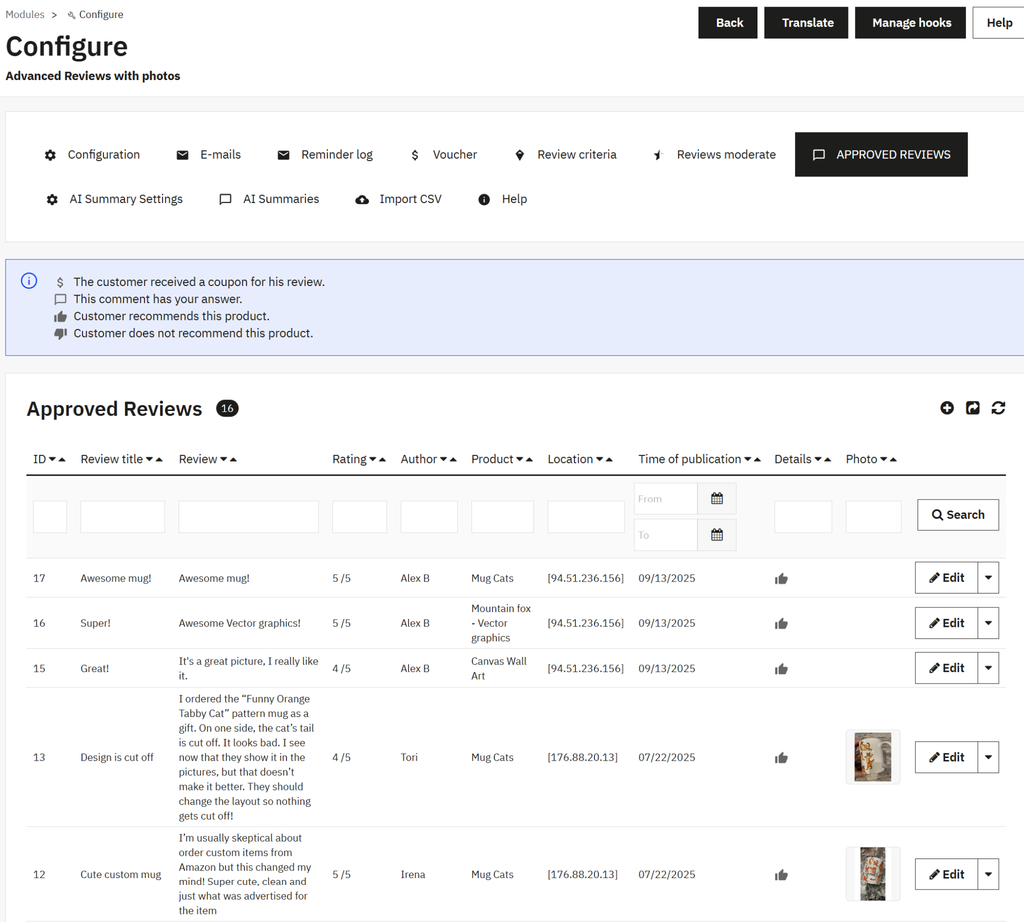
Here’s what I would check:
- Review count. Does it match the number you expected?
- Ratings. Are the original star ratings still there?
- Products. Are reviews attached to the right products?
- Dates and authors. Does the information look correct?
- Storefront. Can customers actually see the reviews?
Don’t rely only on the number of records in the back office.
Open a few product pages and check how the reviews look there.
Also, make sure you aren’t displaying the same reviews twice through both the old and new modules.
Once you’re happy with the result, you can disable the old review display. Keep your database backup for now.
Common Problems After Migrating PrestaShop Reviews
Here are a few things that can go wrong, and where I’d look first.
| Problem | What to check |
|---|---|
| Reviews imported but don’t show on product pages | Review approval settings and theme hooks |
| Some reviews are missing | Pending or deleted reviews, and import limitations |
| Star ratings look different | Rating scales and additional rating criteria |
| Reviews appear on the wrong products | Product ID mapping |
| Duplicate reviews appear | Both modules displaying reviews, or repeated imports |
If the reviews are visible in the back office but not on the product page, the problem may be with how the module displays them rather than with the import itself.
I wouldn’t run the import again until I understood what went wrong. Some importers may create duplicates when run more than once.
Frequently Asked Questions
Where does PrestaShop store product reviews?
The standard Product Comments module stores its main review records in the product_comment database table.
Other tables hold related information, such as additional rating criteria. Table names include your store’s database prefix, usually ps_.
Can I export PrestaShop reviews to CSV?
Yes. You can export review data from the database or use a compatible export tool.
Just remember that another reviews module may expect a different CSV format. You might need to rearrange the columns before importing.
Will I lose reviews when upgrading to PrestaShop 9?
Not necessarily. Upgrading PrestaShop and changing your reviews module are two different things.
Check whether your current reviews module supports the new PrestaShop version. If you need to replace it, make a backup and test the migration before upgrading your live store.
Can I uninstall Product Comments after importing the reviews?
Once you’ve checked that the reviews are safely stored and displayed by the new module, you can consider removing the old one.
But don’t uninstall it before the migration. Uninstall behavior depends on the module, and you don’t want to discover too late that your original data is gone.
Final Thoughts
Moving product reviews isn’t usually difficult. The important part is making sure nothing gets lost along the way.
If your new module supports direct Product Comments import, the whole process can be as simple as clicking a button and checking the results.
For reviews from other sources, CSV import gives you more flexibility, although it takes a little more preparation.
If you’re looking for a module that supports both methods, you can have a look at Advanced Product Reviews for PrestaShop.
And whatever method you choose, keep a backup until you’ve checked your reviews on the storefront. It’s always easier to spend a few minutes checking than to recover missing reviews later.