
Letting other people sell products in your PrestaShop store sounds like a fairly straightforward extension.
Give each seller an account, let them add products, and take a commission from every sale.
But once you start thinking about actual orders, things get more complicated. What if a customer buys products from three different sellers in one checkout? Who approves those products? When does each seller earn their money? And what happens if part of the order is refunded?
These are the questions that matter when turning a regular PrestaShop store into a multi-vendor marketplace.
Let’s look at the decisions behind a marketplace setup and how they affect everyday store operations.
Can PrestaShop Support Multiple Sellers?
PrestaShop is built around a single merchant managing the catalog and orders.
You can create employee accounts with different permissions, but that doesn’t make them independent sellers. They would still be working inside the store’s administration system.
A marketplace needs a different setup: sellers manage their own products and earnings, while the store owner controls the shared catalog, checkout, and payments.
That requires additional functionality, usually provided by a marketplace module.
But installing a module is only the starting point. You still need to decide how your marketplace will operate.
Step 1: Decide Who Can Become a Seller
The first decision is whether anyone can become a seller or whether every application needs approval.
Open registration sounds attractive, especially when you’re trying to grow a marketplace. But more sellers also mean more products to review, more questions to answer, and more opportunities for unsuitable listings.
For a new marketplace, starting with approved sellers is usually easier to manage.
Consider three things:
- Who can apply? Any registered customer or only selected customer groups?
- What can they sell? Products from any category or only approved categories?
- Who approves sellers? Does someone review applications before giving access to seller tools?
A handmade marketplace might accept individual creators but restrict product categories. A B2B marketplace might work only with verified business accounts.
These aren’t just registration settings. They determine how much control you’ll have over the catalog later.
Step 2: Give Sellers Their Own Workspace
One thing I wanted to avoid when building my Multi-Vendor module was giving sellers access to the PrestaShop Back Office.
Sellers need to add products, update prices, check orders, and see their earnings. They don’t need access to the store’s administrative interface.
That’s why the seller area lives inside the customer account.
But there’s another question: how much freedom should sellers have?
Take product publishing.
A seller creates a product, adds photos, sets the price, and saves it. Should it immediately appear in the catalog?
For a small curated marketplace, probably not.
Product moderation gives the store owner a chance to catch missing descriptions, incorrect categories, or unsuitable listings before customers see them.
Of course, moderation has a cost. Every new product may require someone to review it.
There’s no perfect setting for every marketplace. Start with approval if catalog quality matters, and relax the process later if your sellers prove reliable.

Step 3: Work Out the Commission Model
Now comes the money.
Suppose a seller lists a product for €100 before tax, and the marketplace charges a 5% commission on that tax-exclusive price.
The marketplace keeps €5, leaving €95 in seller earnings before any other adjustments.
The arithmetic isn’t complicated. Choosing the amount on which the commission is calculated is where mistakes can happen.
Should you use the tax-inclusive or tax-exclusive product price? Should every seller follow the same rate?
Some marketplaces also use fixed seller earnings instead of percentage commissions. The seller receives an agreed amount for each item, regardless of the retail price.
These models serve different purposes:
- A percentage commission is straightforward when the marketplace earns a share of each sale.
- Fixed seller earnings work when you’ve negotiated a specific amount per item.
- Individual commission settings allow different commercial agreements with different sellers.
Document how the calculation works. Sellers should be able to understand their earnings without having to reverse-engineer your commission settings.
Step 4: One Order Doesn’t Always Mean One Seller
This is where marketplace logic gets interesting.
Imagine a customer adds two products to their cart:
- An €80 ceramic vase from Seller A.
- A €40 handmade bag from Seller B.
The customer sees one cart and completes one checkout.
Behind the scenes, however, the marketplace needs to associate each product with its seller and calculate their earnings separately.
And the order isn’t necessarily finished just because the customer clicked Place order.
Payment might still be pending. The customer might cancel the order. Or one product might be refunded while the other remains purchased.
In my Multi-Vendor module, seller earnings are calculated when an order reaches configured statuses.
For example, you can base earnings on a paid or delivered status rather than simply on order creation.
A mixed order also raises another question: what happens to the sellers’ balances when only one product is refunded?
Check how your marketplace handles that situation. A partial refund may require a different adjustment than a full order cancellation.
There’s also an operational detail worth understanding: in this marketplace model, shipping, carriers, and order fulfillment remain under the store owner’s control.
Sellers can see their orders and earnings, but they aren’t running independent checkout and shipping systems.
This distinction affects how you organize the business, not just how you configure the module.
Step 5: Keep Earnings and Payouts Separate
A seller’s total earnings and available balance aren’t necessarily the same thing.
Suppose a seller has €80 in recorded earnings, but €30 comes from orders that haven’t reached the required status.
Only €50 is available for withdrawal under those rules.
A marketplace needs to distinguish between money earned, money available, and money already paid.
It also needs a clear withdrawal process.
Set a minimum payout amount if appropriate, decide how frequently requests will be processed, and make sure payments are recorded.
Pay particular attention to rejected or cancelled payout requests. The seller’s balance must stay correct, and the same money shouldn’t be paid twice.
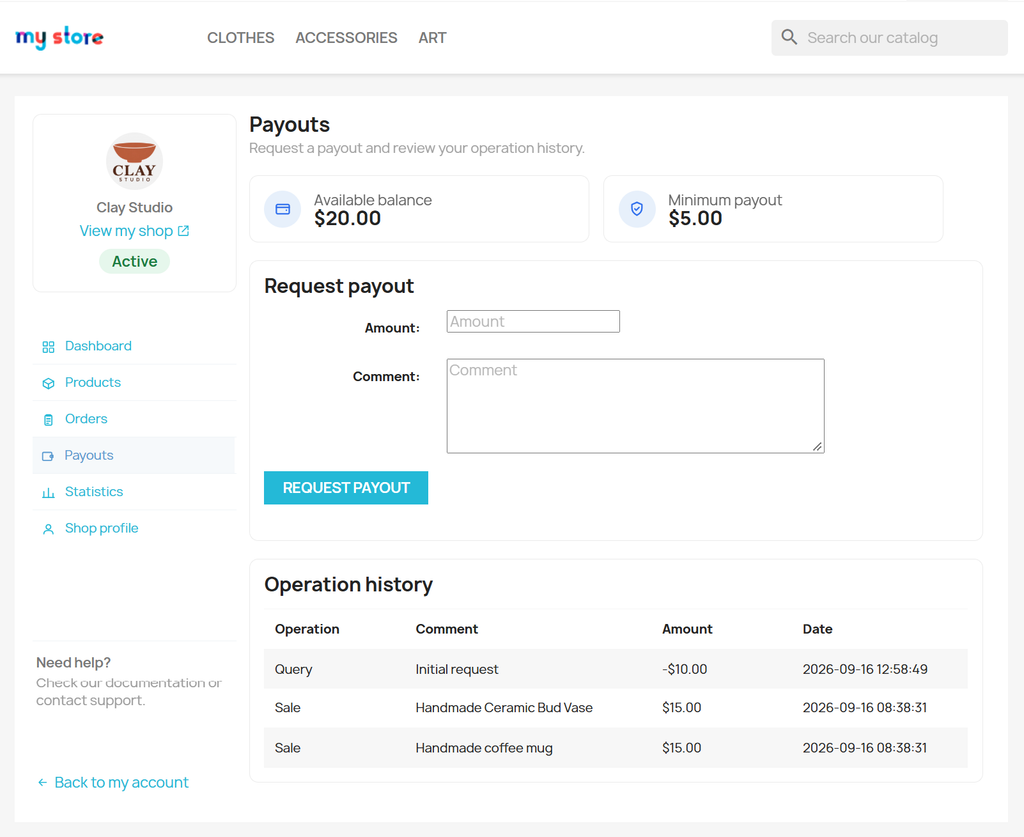
The seller dashboard in my module includes an available balance and a way to request payouts. The actual payment process remains under the marketplace administrator’s control.
Step 6: Test an Order with Products from Different Sellers
A single-seller test won’t tell you much about how the marketplace handles shared orders.
Create two seller accounts and add a product from each. Then use a separate customer account to buy both products in one checkout.
Follow that order through the system:
- Confirm both sellers’ products are approved and visible.
- Place the order containing products from both sellers.
- Open each seller’s dashboard and check the order information.
- Compare the calculated earnings with your commission settings.
- Change the order status and check the balances.
- Test a cancellation or a refund of one seller’s product.
- Submit a payout request and inspect the transaction history.
The partial refund is especially interesting.
The customer sees one order, but the financial consequences aren’t necessarily the same for both sellers.
This is also a good opportunity to check what the seller can see versus what remains available only to the marketplace administrator.
Final Thoughts
A multi-vendor marketplace is still one PrestaShop store. Customers browse one catalog and use one checkout, even when the products belong to different sellers.
The complexity sits behind that storefront: seller permissions, product approval, individual earnings, and payment records.
When I built my Multi-Vendor Marketplace module for PrestaShop, I kept the seller workspace separate from the Back Office while leaving catalog moderation, commissions, and payouts under the marketplace owner’s control.
For me, that separation is the foundation of a manageable marketplace.
The customer buying a vase and a bag shouldn’t have to think about how many sellers are involved. The store owner, on the other hand, needs to know exactly which part of that order belongs to whom.